How Power Apps Templates Simplify HR Processes: Leave Requests and Employee Onboarding Apps
Human Resources teams are under increasing pressure to deliver fast, consistent, and employee-friendly experiences especially on mobile. Manual processes, spreadsheets, and disconnected tools no longer scale in modern organisations.
In 2026, high-performing HR teams are turning to low-code platforms to digitise core workflows like leave requests and employee onboarding without long development cycles or heavy IT dependency. One of the most effective ways to do this is by using ready-made HR templates built on Microsoft Power Apps.
This article explores HR best practices, explains why mobile-first design matters, and shows how Power Apps HR templates accelerate adoption while reducing cost and complexity.
Why HR Processes Must Be Mobile-First in 2026
Employees no longer interact with HR systems only from desktops. Requests, updates, and onboarding tasks happen:
On phones during the workday
On tablets in the field
Across distributed and hybrid teams
When HR tools are not mobile-friendly:
Requests are delayed
Errors increase
Adoption drops
HR teams handle unnecessary follow-ups
Mobile-first HR apps remove friction and empower employees to self-serve a key ranking signal Google increasingly associates with high-quality SaaS and B2B solutions.
HR Best Practice #1: Digitise Leave Requests with Clear, Trackable Workflows
Leave management is one of the most common HR processes and one of the easiest to get wrong.
Common Problems with Manual Leave Requests
Email chains and lost approvals
No real-time status visibility
Inconsistent data
Poor employee experience
Best Practice Approach
A modern leave process should:
Be mobile-first
Allow employees to submit and track requests
Provide clear statuses (pending, approved, rejected)
Reduce HR manual workload
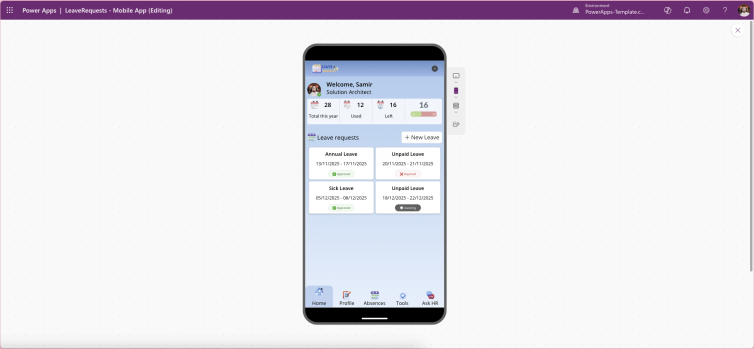
Leave Request Mobile – Power Apps Canvas Template
Provides exactly this. It gives employees a clean mobile UI to submit leave, track history, manage profiles, and get instant guidance through an integrated Copilot agent—without building from scratch.
This template follows Microsoft UI/UX standards, improves adoption, and helps HR teams go live in days instead of months.


HR Best Practice #2: Standardise Employee Onboarding for Faster Time-to-Productivity
Employee onboarding directly impacts:
Engagement
Retention
Time-to-productivity
Yet many organisations still rely on emails, PDFs, and ad-hoc checklists.
What Effective Onboarding Requires
Clear steps and expectations
Consistent experience for every hire
Progress tracking
Mobile access for new starters
The Power Apps Advantage
A structured onboarding app ensures:
Every employee follows the same journey
Tasks are completed in the right order
HR has visibility without chasing
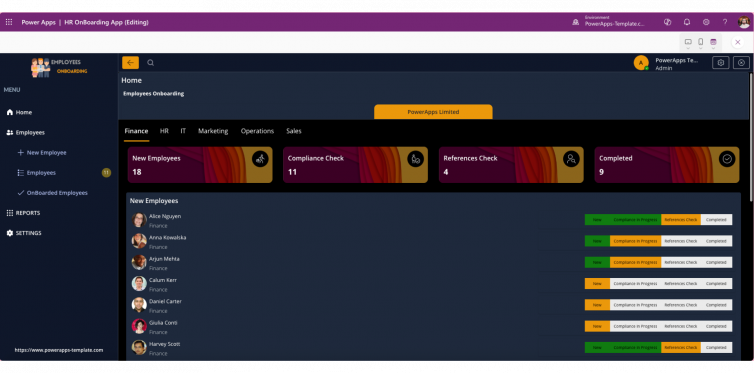
Employee Onboarding – Power Apps Template
Provides a ready-to-use foundation for onboarding journeys, tasks, and progress tracking—designed for mobile use and easy extension.
This approach reduces onboarding friction and delivers a professional first impression from day one.


Why HR Teams Should Use Templates Instead of Custom Builds
Building HR apps from scratch requires:
UX design
Data modelling
Governance setup
Testing and iteration
Templates remove this overhead.
Benefits of HR Power Apps Templates
Faster deployment
Lower cost
Microsoft-aligned UI/UX
Mobile-ready by default
Easier governance and maintenance
Using templates is not a shortcut it is a best practice for scalable HR digital transformation.
How These HR Templates Fit into a Scalable HR Tech Stack
Both templates integrate naturally into Microsoft 365:
Connect to SharePoint or Dataverse
Respect Power Platform DLP policies
Extend with approvals, notifications, and reporting
They also work well together:
Onboarding flows can link to leave management
Employee profiles can be reused
HR data stays consistent across apps
This creates a cohesive, mobile-first HR experience.
Conclusion: Modern HR Starts with the Right Foundation
In 2026, HR success is defined by simplicity, mobility, and adoption. Digitising leave requests and onboarding with Power Apps templates enables HR teams to deliver better experiences—without technical complexity.
By using:
Leave Request Mobile – Power Apps Canvas Template
HR teams can modernise faster, reduce manual work, and improve employee satisfaction from day one.