



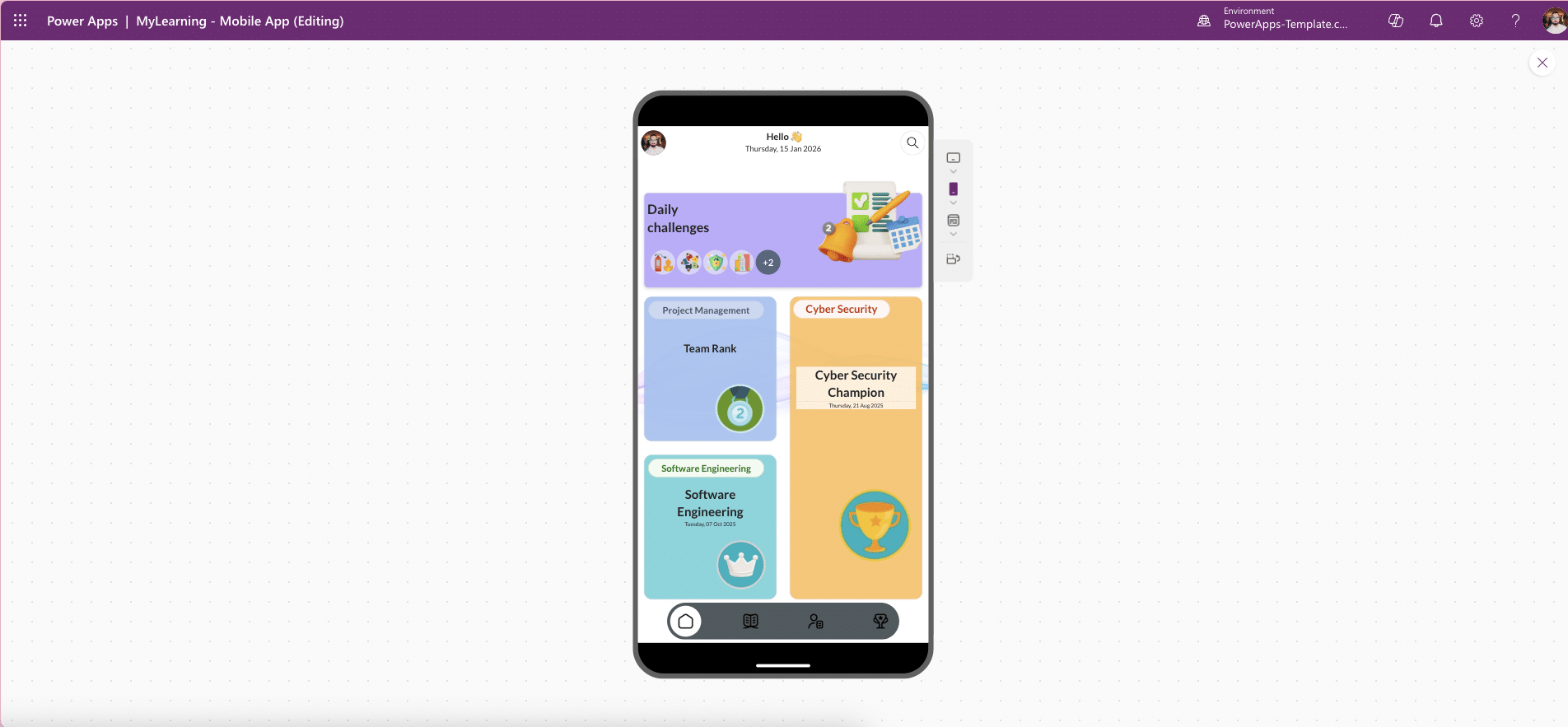


MyLearning – Corporate Training App for Power Apps Mobile (Canvas Template)
MyLearning is a mobile-first Power Apps Canvas training app designed to deliver modern corporate learning experiences on the go. It enables organisations to publish bite-size courses, run assessments, and award digital badges securely inside the Microsoft 365 ecosystem.
Built on Microsoft PowerApps, MyLearning gives employees a fast, intuitive way to learn anytime, anywhere, while giving admins a low-code, governed foundation that is easy to extend and scale.
Product Overview
MyLearning is a lightweight, mobile-optimised Canvas app created for corporate learning and enablement. Employees can browse learning paths, consume videos and articles, take quizzes, and earn shareable badges, all from a clean, touch-friendly interface.
Because it runs natively in Power Apps, MyLearning integrates seamlessly with Microsoft 365 services and respects Power Platform governance and security boundaries.
Why MyLearning Is Ideal for Corporate Training
Mobile-First User Experience
Designed for phones with responsive layouts
Clear typography and touch-friendly navigation
Optimised for busy, on-the-go employees
Structured Learning Paths
Organise content by topic, role, or level
Support Foundations, Essentials, and Advanced tracks
Clear progression through lessons and courses
Assessments & Scoring
Multiple-choice quizzes
Immediate feedback and pass marks
Retakes supported for reinforcement learning
Gamified Badges
Award completion badges automatically
Support streaks and achievement milestones
Boost engagement and motivation
Search & Bookmarking
Keyword search across courses and lessons
“Save for later” for quick access
Built for Microsoft 365
Native Power Apps Canvas app
Easy integration with SharePoint or Dataverse
Results and content stay within your tenant
Admin-Ready by Design
Add or edit courses, questions, and badge rules via lists or tables
No redeployment required for content updates
Ideal for HR and L&D teams
Secure & Governed
Respects tenant DLP policies
Aligns with Power Platform governance standards
Suitable for enterprise environments
Typical Use Cases
MyLearning supports a wide range of corporate learning scenarios:
New-hire onboarding micro-lessons
Sales and product enablement refreshers
Compliance training with proof of completion
Just-in-time learning for field and frontline teams
What’s Included
Mobile-optimised Canvas app screens:
Home, Categories, Course, Lesson
Quiz, Results, Badges, Profile
Example data schema for:
Courses, lessons, questions
Attempts, scores, and badges
Prebuilt quiz flows:
Question shuffle
Scoring logic
Pass/fail handling
Badge logic ready to extend:
Points, thresholds, expiry rules
Note:
The template is data-source-agnostic and can be connected to SharePoint or Dataverse. Badge images can be stored as app media or served from SharePoint/CDN.
Why Buy a Power Apps Training Template Instead of Building One?
Creating a learning app from scratch requires UX design, logic, testing, and governance setup. MyLearning removes that overhead by providing a production-ready foundation.
Benefits include:
Faster time-to-market
Lower development and design costs
Consistent mobile UX
Easy extensibility with low-code
👉 Add MyLearning – Corporate Training App for Power Apps Mobile to your cart and launch a mobile learning experience in minutes.
Product Details:
Product Type: Digital Power Apps Canvas Template
Platform: Microsoft Power Apps
Layout: Mobile
Theme: Light
Category: Training & Learning
Tags: HR Learning, Mobile Training, Corporate Training


